 ConvertUniverse
Why Basic OCR Failed Our B2B Clients (And What Actually Fixed It)
OCR extracts text but skips routing, archiving, and field mapping. Here is the pipeline architecture that eliminates manual B2B invoice processing for good.


Basic OCR fails for B2B invoice processing because it only extracts text — it does not route the document, map fields to a schema, or archive to storage. The result is a blob of unstructured text that still requires manual intervention to use. A complete invoice automation pipeline combines OCR extraction with routing, field mapping, and storage in a single automated workflow.
The direct answer: a basic OCR tool solves the wrong problem. It reads characters off a page and outputs a text string. Routing that string into your accounting software, archiving the original PDF with a consistent naming convention, triggering approvals, and logging an audit trail — none of that is OCR. It is the other 90% of the workflow, and a basic OCR integration doesn't touch it.
The operations team isn't slow. The process is broken.
What 15 Hours of Manual Invoice Work Actually Costs
Consider exactly what happens between "invoice received" and "payment approved" in a typical B2B agency:
- The PDF attachment is downloaded from the shared inbox and saved to a desktop
- The relevant fields are found and read — vendor name, invoice number, due date, line items, total
- Those fields are manually entered into the accounting software or a Google Sheet
- The original PDF is renamed and filed in the right folder
- If the total clears a threshold, someone notifies the manager for approval
An OCR tool speeds up step 2 modestly. It doesn't touch steps 1, 3, 4, or 5. You've added a tool and kept four of five manual steps intact.
At a fully-loaded $35/hr for an operations coordinator, 15 hours per week is $27,300 per year — spent on work that generates zero strategic value. The invoices get processed either way. The difference is who's doing it.
Why Does Basic OCR Still Leave Your Team Doing Manual Work?
This is worth being precise about, because most teams add OCR and expect a much larger improvement than they get.
A standard OCR integration — PDF.co through Zapier, Adobe PDF Services, a standalone desktop tool — does one thing: reads the characters on the page and emits them as text. For a clean, machine-generated one-page invoice, this output is readable. The problem is what it looks like:
INVOICE #INV-2024-0847 Acme Supplies Co. Date: March 15 2026 Due: April 15 2026
Professional Services 40 hrs $150.00 $6,000.00 Software License 1 seat $299.00 $299.00
Total Due: $6,299.00
No column headers. No row boundaries. No semantic separation between the invoice number and the vendor name. The OCR engine reads the page left-to-right across the full surface, discarding all spatial relationships that made the original document parseable.
Someone or something has to take that string and map it to the right fields. A human does it slowly. A regex script does it until a vendor changes their template, adds a line item, or sends a two-page invoice — then it breaks silently and corrupt data reaches your ledger with no error signal.
A layout-aware extraction engine approaches this differently. It runs an object detection model over the page geometry first, treating each table cell as a separate recognition unit. The output is structured JSON with preserved row and column relationships — not a flat text string. Read the full technical breakdown of how layout-aware OCR engines work →
The Problem Is Not OCR Quality — It Is OCR Scope
The instinctive fix is to buy better OCR: upgrade to a premium API, switch vendors, or train a custom model. This addresses the wrong constraint.
Even if your OCR output were perfectly structured — clean JSON with every field correctly labeled — you have only solved field extraction. The rest of the invoice lifecycle still requires manual intervention:
| Task | Handled by OCR? | Still manual? |
|---|---|---|
| Extract vendor name, total, due date | Yes (basic) | No |
| Rename PDF with consistent convention | No | Yes |
| Archive original PDF to correct folder | No | Yes |
| Append row to Google Sheets | No | Yes |
| Notify manager if total > threshold | No | Yes |
| Maintain searchable audit log | No | Yes |
A better OCR call fills in one cell in that table. The other five cells remain human work. Buying better OCR is solving a photocopier problem when the filing system is broken.
Building the Zero-Touch Invoice Pipeline
The right architecture treats OCR as one node in a larger automated lifecycle — not the end of the process, but the middle of it.
Step 1: Automated Ingestion
The pipeline starts before anyone opens their inbox. When a vendor sends an invoice, the email attachment is intercepted automatically. No downloading, no dragging files to a desktop folder. The document enters the system the moment it arrives.
Step 2: Layout-Aware Field Extraction
Instead of a raw text dump, a layout analysis model runs over the page geometry before character recognition. Tables are identified as structured objects; each cell is recognized independently. The output is a JSON payload with labeled fields:
{
  "vendor_name": "Acme Supplies Co.",
  "invoice_number": "INV-2024-0847",
  "invoice_date": "2026-03-15",
  "due_date": "2026-04-15",
  "line_items": [
    { "description": "Professional Services", "qty": "40 hrs", "unit_price": "$150.00", "total": "$6,000.00" },
    { "description": "Software License", "qty": "1 seat", "unit_price": "$299.00", "total": "$299.00" }
  ],
  "total_due": "$6,299.00"
}
This data arrives correctly structured regardless of vendor template variation. No regex maintenance. No month-end surprises when a supplier redesigns their invoice.
Step 3: Split-Logic Routing
This is the part that makes OCR-based workflows look antiquated by comparison. A single branch node sends the document and the extracted data to two destinations simultaneously:
Compliance archive: The original PDF is renamed using dynamic variables — {{vendor_name}}_{{invoice_date}}_{{invoice_number}}.pdf — and pushed to a Google Drive folder designated for that vendor or time period. The naming convention holds for every invoice, automatically.
Data staging: The extracted fields are mapped directly to a new row in Google Sheets. Vendor name in column A, invoice number in B, due date in C, total in D. No copy-paste. No column mismatch from a moment of inattention.
Add a conditional node — if total_due > $5,000, send Slack message to [manager] — and approval routing is automated as well.
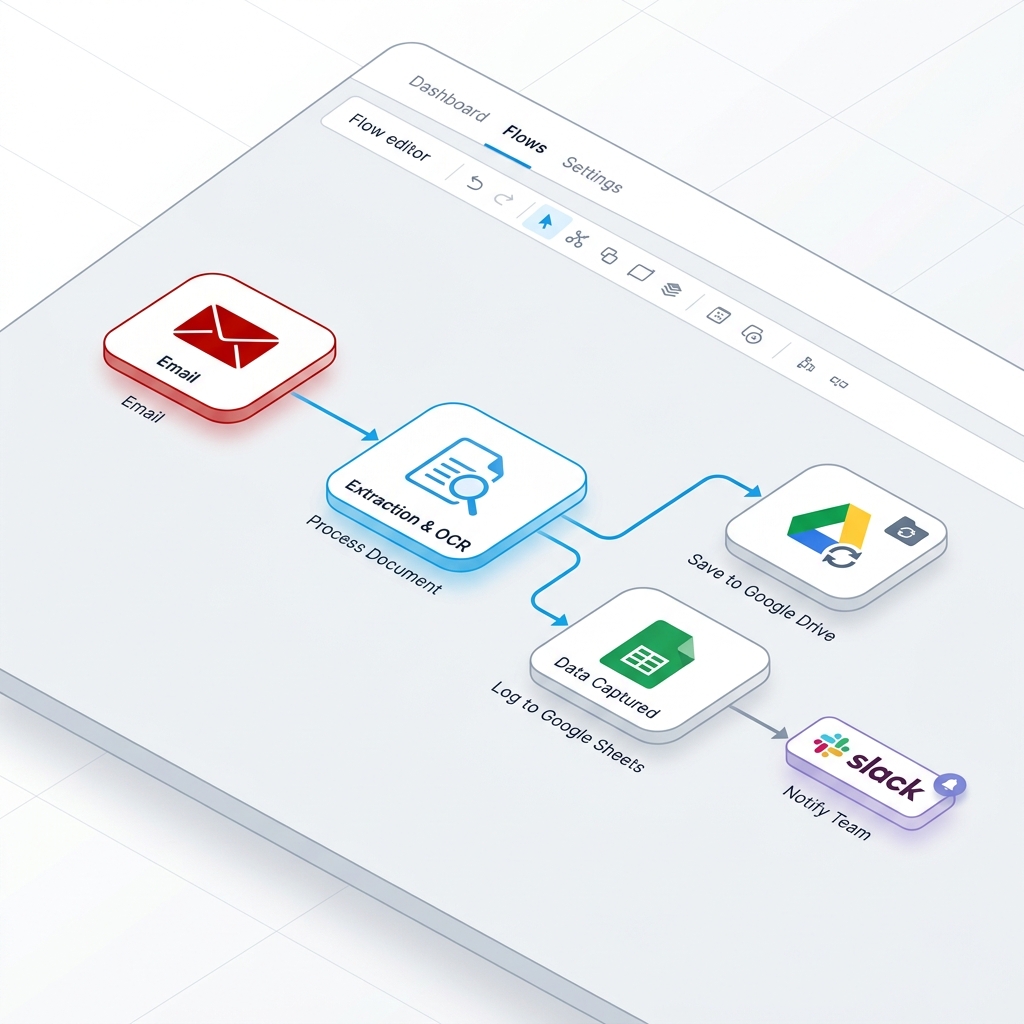
The entire pipeline runs without a human touching the keyboard.
This pipeline is priced per workflow execution, not per node. A 6-step pipeline costs the same to run as a 2-step pipeline — which matters when your invoice volume scales. Read: How Zapier's per-task pricing model compounds the cost of document pipelines →
What This Pipeline Eliminates — And What It Doesn't
Being honest about scope matters here.
What it replaces:
- Manual inbox monitoring and file downloading (saves ~2–3 hrs/week)
- Copy-pasting extracted data into spreadsheets (saves ~6–8 hrs/week)
- File renaming and folder sorting (saves ~2–3 hrs/week)
- Manually routing above-threshold invoices for approval (saves ~1–2 hrs/week)
What it doesn't replace:
- Exception handling. Invoices that arrive as images embedded in Word documents, or attachments split across a multi-part email thread, still need a human. The pipeline should route these to a review queue rather than fail silently.
- First-run validation for unusual vendor formats. Layout-aware extraction handles template variation well, but a genuinely novel invoice format — unusual column order, non-standard fonts, landscape orientation — should be spot-checked in the first few executions.
- Approval judgment. The pipeline routes an invoice to the right person. It cannot make the decision. That's appropriate — the goal is to eliminate logistics, not judgment.
In practice, an operations team running 15 hours per week on invoices realistically reclaims 11–13 of those hours. The remaining 2–4 hours go to exceptions and edge cases — which is the right use of human attention.
The Audit Trail as a Side Effect
One outcome teams consistently undervalue until an audit happens: the log is automatic.
In a manual workflow, audit trails depend on human discipline. Someone has to remember to file the invoice. Someone has to remember to note when it was received and who approved it. When a vendor disputes a charge eight months later, you're searching a shared inbox and hoping the naming convention held.
In an automated pipeline, the audit trail is a byproduct of removing the human from the logistics. Every invoice that enters the system is filed correctly, named correctly, timestamped, and logged in the spreadsheet. The Google Drive folder is a complete archive. The Sheet is a complete ledger. Neither requires anyone to remember to do something.
If your invoice archive contains vendor contracts or purchase orders with personally identifiable information, the compliance picture extends beyond audit trails to where and how documents are processed. Read: Why uploading sensitive documents to cloud converters creates compliance risk →
For teams whose next step is a presentation — monthly invoice summaries for the CFO, vendor spend reports in a locked .pptx template — PPTAutomate maps the extracted JSON from this pipeline directly into slide templates. ConvertUniverse handles extraction and routing; PPTAutomate generates the presentation layer automatically.
Build Your Invoice Pipeline
Core Conversion Engine
Powered by 6GB Docker Infrastructure
Ready to test the engine?
No signup required. 100% free.
The ConvertUniverse workflow builder is in private beta. The invoice pipeline described above — email trigger, layout-aware extraction, split-logic routing to Drive and Sheets, conditional approval notification — is available as a starting template. You can connect it to your own Google account and process your first invoice in under 20 minutes.
Automate Your Whole Document Pipeline
Stop doing manual tasks. Start building node-based visual workflows and automate your document processing today.
More from the blog
Keep reading our engineering insights.